Run a free AI focus group with synthetic users in Claude Code or Codex.
Reliqio's AI focus group is a free add-on (AI skill) for Claude Code and Codex. It shows your copy to a panel of synthetic users: AI personas, fictional readers created to match the audience you describe. The report includes charts, quotes, and recommended changes. A study uses your own AI plan: Claude, ChatGPT, or both.
- Updated:
- Version:
- 1.0
- Size
- 8 files

Who it's for.
Founders, marketers, product managers, and researchers: anyone whose copy has to make sense to a stranger. Marketing teams can use it to test concepts and messaging before a campaign. Product teams can use it to check how a feature is explained before launch.
The panel can flag wording that confuses its AI readers and question copy that leaves questions unanswered. Those are possible conversion barriers.
What you can test. Examples.
The skill runs three kinds of studies: message testing, first impressions, and concept testing.
Landing page. What does a first-time reader take from it?
Product or feature description. What does the panel understand, and what would they do next?
Pitch or positioning statement. How does the panel read your message?
Email, an ad, or pricing copy. What stops a reader from taking the next step?
Ad copy variations. Run one study per variation and compare the reports.
Onboarding copy. The welcome email or first-screen text a new user reads.
Use it between rounds of real research.
Research happens in rounds. Questions don't. Say a recent study left one open, and your next round of user interviews is weeks away. Run the copy past the panel now, and take what it raises into those interviews.
Use it early.
Synthetic user testing also suits early-stage work: generating hypotheses, pre-testing the wording of a survey or message, and getting a first read on a segment that's hard or expensive to recruit. Turn what the panel raises into hypotheses, then test them with real readers. That makes it a hybrid method: the panel first, real users second.
It isn't a problem exploration interview, and it won't map the problem space, pain points, or user behaviors. It gives you sharper questions and stronger hypotheses to bring to a full study, so the budget for research with real people goes to the questions that matter.
Give the chat a document or a web page, and it pulls out the words. Each study covers one text, cut at 12,000 characters unless you lift the limit. The skill can't compare versions. It isn't a usability study or a customer discovery interview, and it's no basis for final design decisions.
What you get back.
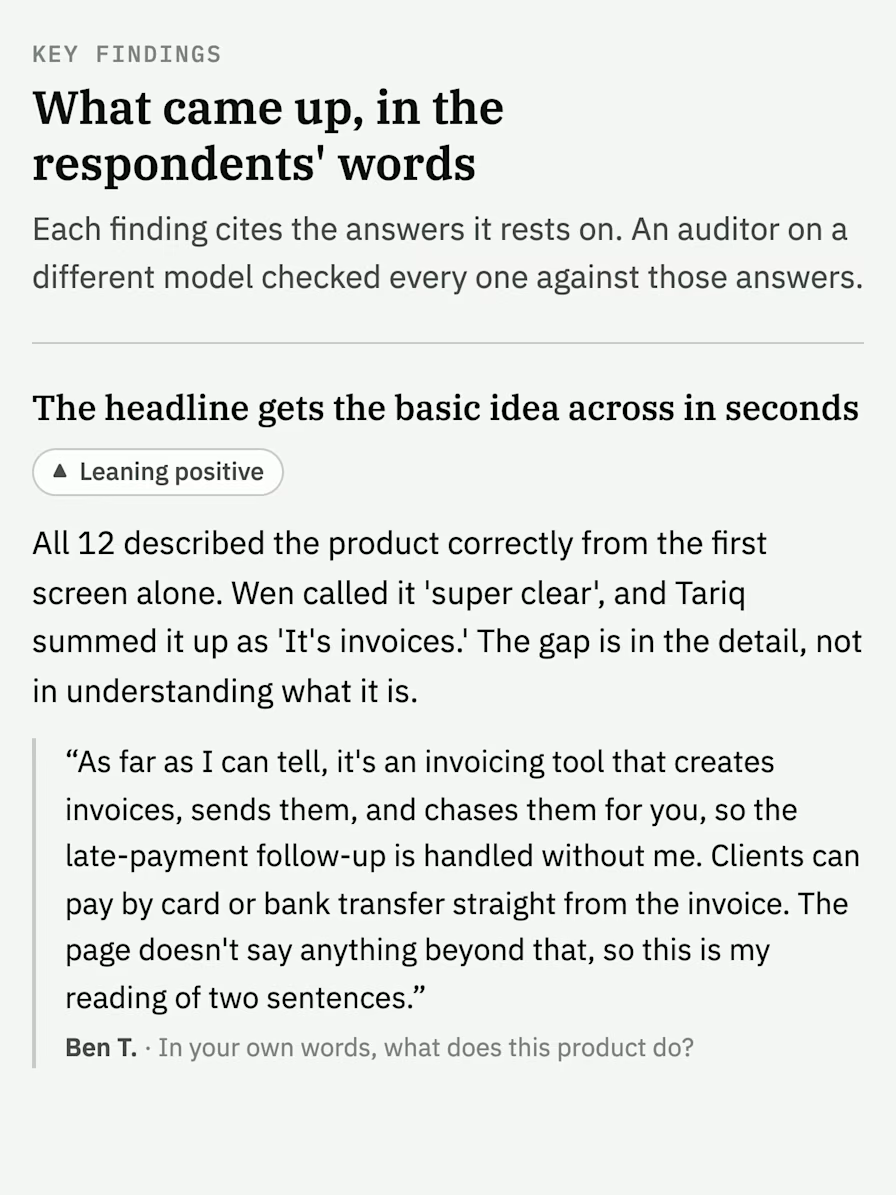
Key findings with quotes from named AI respondents.
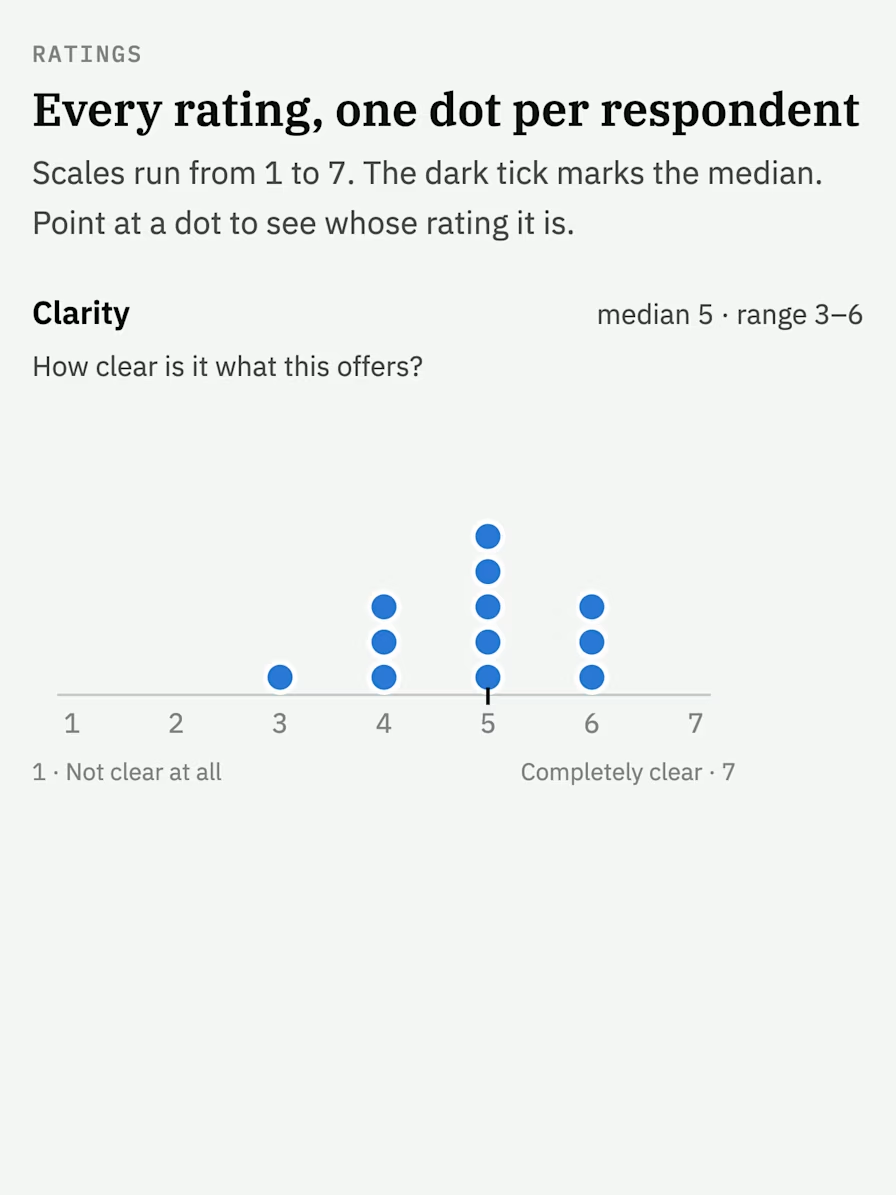
Rating charts on 1–7 scales, one dot per respondent.
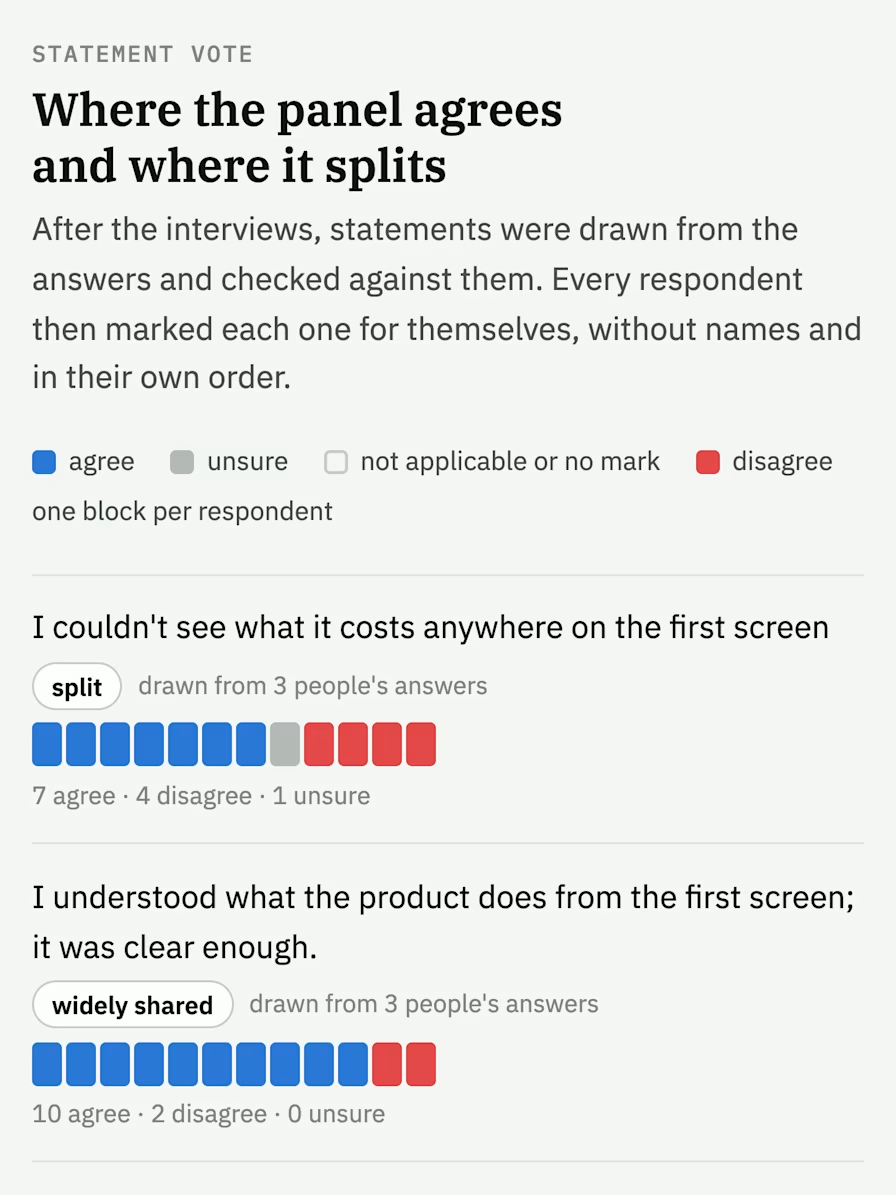
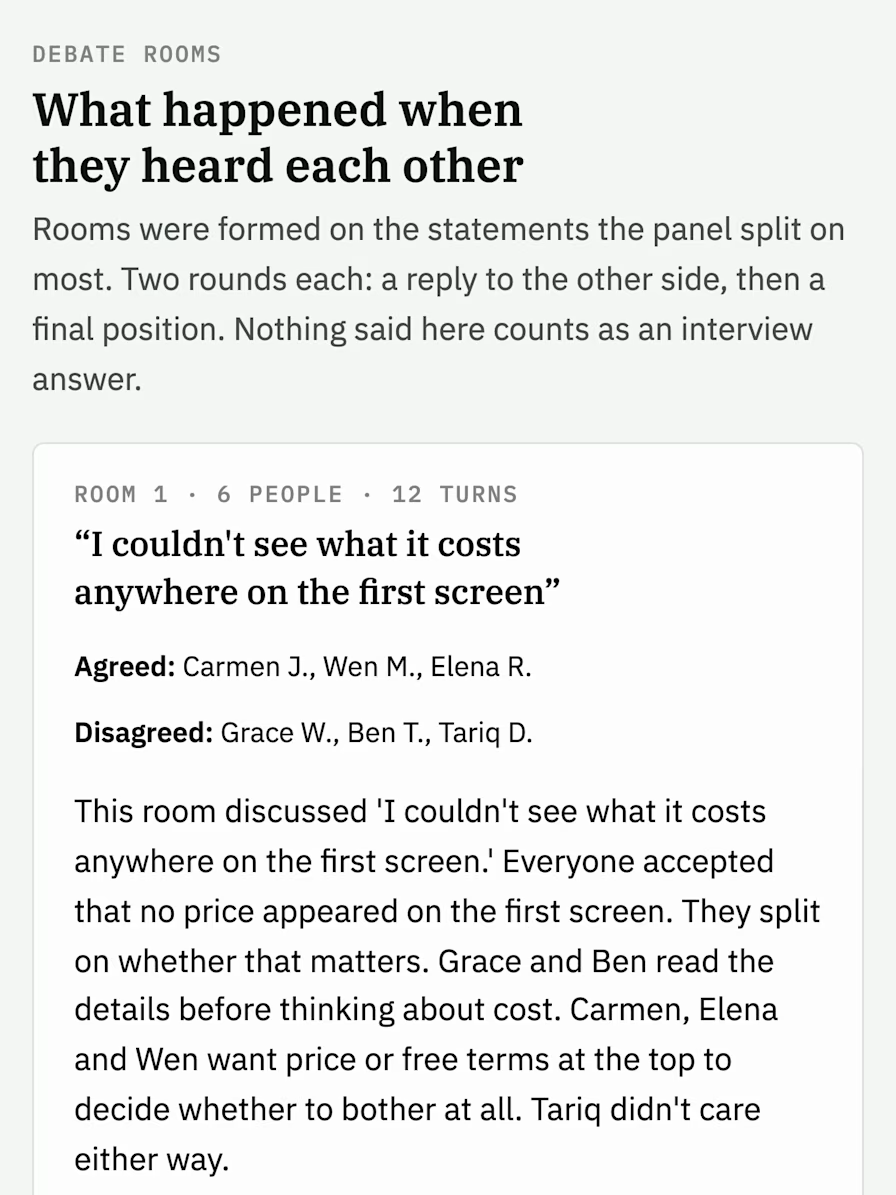
Vote results that show where the panel agrees and where it splits.
Up to 3 debates on the statements that split the panel most.
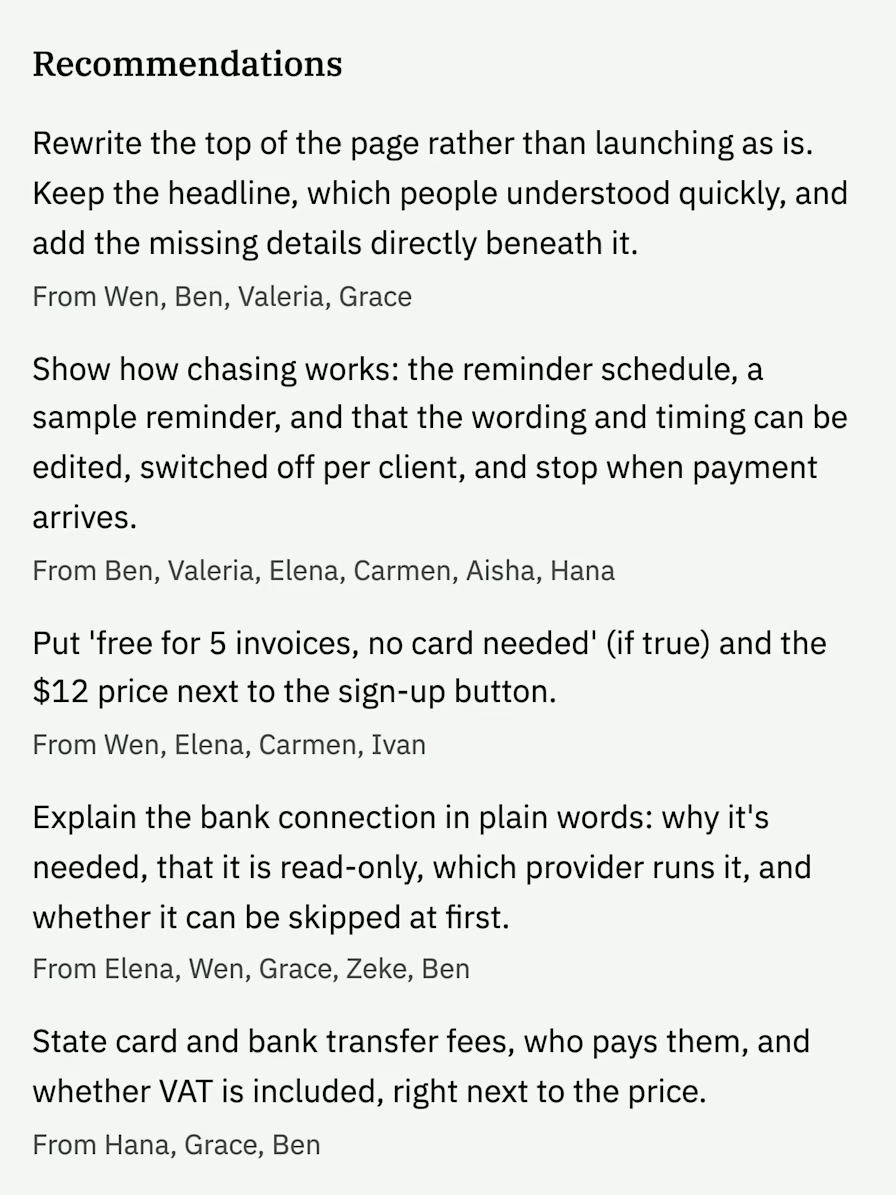
Objections & recommendations.
Executive summary.
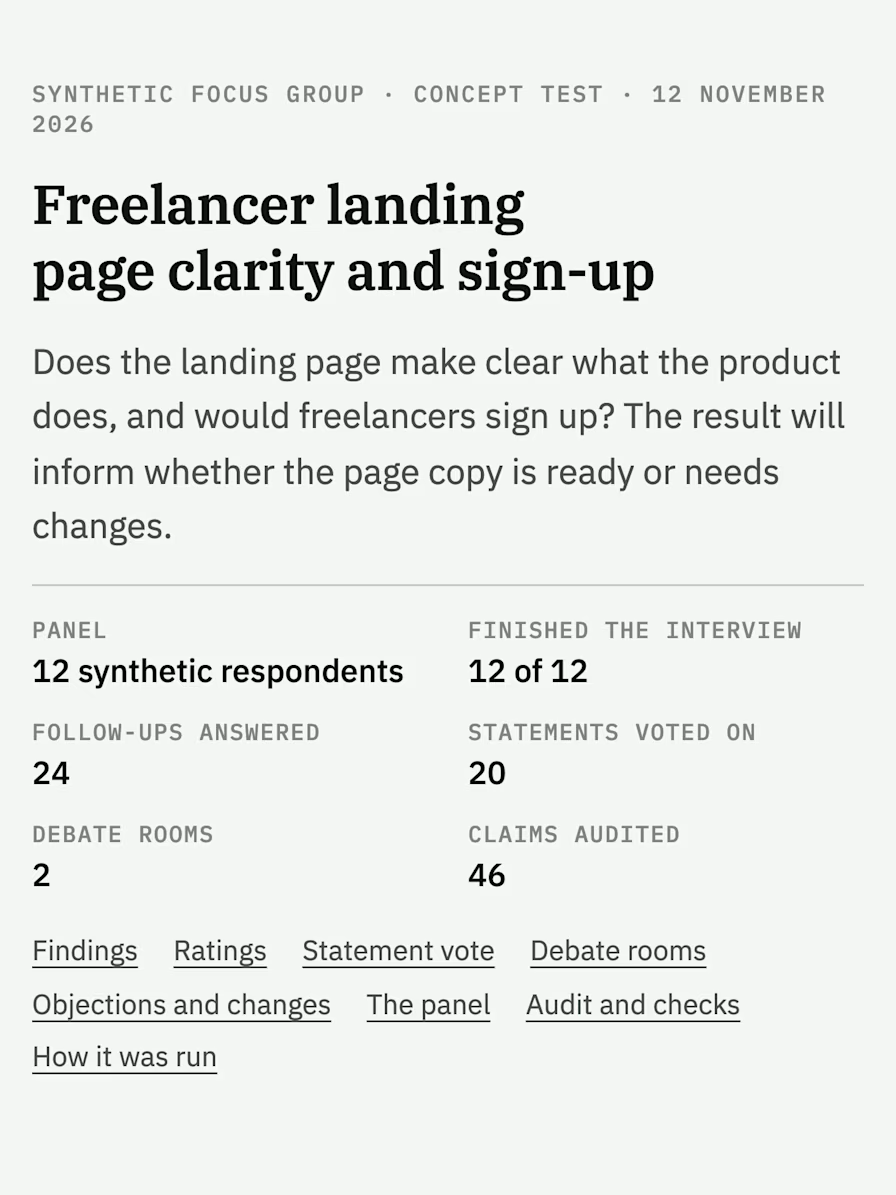
We tested a landing page for a fictional invoicing tool on a panel of 12. The report says all 12 could explain what the product does from the text on the first screen. When asked what they'd do next, 10 of the 12 AI respondents chose "look for more information first." How real readers would answer is unknown.
The panel wanted to know how payment reminders worked. Eleven of the 12 asked what "chasing" an invoice means in practice. The finding cites this answer from AI respondent Hana S.
What I'd really want to know is whether I can see and change the wording, because I'm not having some cheery robot message going out under my name.
Show a sample reminder, give the schedule, and explain what users can edit. The recommendation cites Hana's answer. The report lists every answer a finding cites, so you can trace each one back.
How the AI focus group works.
The chat takes your brief and your approvals. The helper program runs the study.

- Brief. Paste one piece of copy. Say who it's for and what you need to decide.
- Interview guide. The chat drafts the questions for the panel. You approve them.
- Request count. A request is one message sent to an AI model. The chat may send a few small requests to check the setup. It then tells you how many it plans to send for the study. You decide whether to go ahead.
- Panel. The skill recruits two candidates for every seat, so a panel of 12 starts with 24 fictional reader profiles. Each answers a questionnaire as that reader. The skill drops candidates whose answers conflict, then seats a panel with a range of views. This screening checks persona consistency. It doesn't show that the personas behave like real people. You approve the panel.
- Study. Respondents are interviewed separately. The panel then votes on statements drawn from the answers, and can debate up to three that split it most.
- Report. One AI model writes the findings. A different model checks each one against the answers it cites. Unsupported claims are removed, and claims with partial support are flagged.
Who plays the synthetic users?

In Claude Code, Claude models of different sizes play the panel. You can add OpenAI models, and we've run two studies that way. See "Which AI models play the respondents?" in the questions at the end.
In Codex, OpenAI models play every role.
How the personas are made. Some tools build synthetic users from customer data. This skill writes each AI-generated persona from the audience description you give it. It uses no demographic, psychographic, or behavioral datasets about real people, and it isn't trained on your customers' data. It simulates one reading of one text, not user journeys or behavior over time. Add OpenAI models to a Claude panel, and you get a small ensemble of large language models from two labs.
Where it runs.
- Claude Code, in the Code tab of the Claude desktop app on a Mac.
- Codex, OpenAI's coding tool. Codex can ask you to approve commands that need internet access.
Both need Node.js 18 or later, a free program.
Time and usage.
The invoicing study ran in Claude Code. With 12 Claude respondents on the panel, the full run used 136 requests and took about seven minutes.
| Part | Requests | Running time | Tokens (unit of text) |
|---|---|---|---|
| Recruiting questionnaire | 24 | 12 s | 77,003 |
| Study | 110 | 4 min 39 s | 527,861 |
| Writing and checking the findings again | 2 | 2 min 17 s | 56,636 |
| Total | 136 | about 7 min | 661,500 |
Allow extra time for your brief and approvals. The chat that runs the study uses your plan too, and the table leaves that out. Budget about 11 requests for each respondent. The skill has no separate spending cap.
One model reads all the answers at once, and Codex can handle less text at a time than Claude Code. If you want more than 12, go up in small steps.
How reliable are synthetic users?
We haven't compared the panel's answers with answers from real people, so we don't know how closely they match. No independent validation study of this skill exists yet. The ratings and votes describe this simulated panel, not a real audience. Agreement isn't confidence: even if every persona agrees, that doesn't tell you how many real readers would.
Read the results as directional signals, not measurements. Four limits to keep in mind:
- Fluent isn't the same as true. AI answers read well, and that believability can mislead.
- No real context. A persona has no environment and no real emotions: it isn't tired, rushed, or reading on a phone. Real users will surprise you with insights the panel can't produce.
- Bias in, bias out. Answers can reflect biases in the AI models and in the prompts: how you describe the audience and word the questions. A panel of varied fictional profiles isn't a representative sample of a real audience. Synthetic panels can also become echo chambers: they repeat familiar assumptions and miss outliers, and that bias can hit underrepresented groups hardest.
- Results drift. AI models change, so the same study can come back different. Re-run it before relying on an old report.
Treat each finding as a question for real research. The invoicing panel asked how payment reminders work. Take that to real users as a question to explore, not an established problem: what would they need to see before letting a tool send a reminder under their name?
The checker makes mistakes too. It checks whether each finding is backed by the panel's answers, not whether real people would give those answers. In our invoicing study, it flagged an overstated summary and made at least two mistakes of its own.
Synthetic users vs. real users.
Synthetic users give quick, simulated feedback on copy. Real participants give you lived experience and evidence of actual behavior. Some synthetic user platforms publish parity figures from comparison studies of AI interviews and real-world interviews, but matching recurring themes isn't the same as matching depth, nuance, or individual behavior, and a figure from another tool doesn't carry over to this skill or your audience.
Compare the panel with real users.
We haven't run a parity study with real participants and the panel side by side. Until real user data says otherwise, plan additional human testing before you act on a finding. Keep a simple scorecard of what the panel predicted and what real users then did: the themes both groups raised, the issues only real participants raised, and the concerns only the panel raised. Over time, it shows how far to trust the panel for your audience.
What published research shows.
In Generative Agent Simulations of 1,000 People (2024), AI agents built from two-hour interviews with real people reproduced those people's survey answers 85% as accurately as the people did themselves two weeks later. In a forecasting study, an ensemble of 12 large language models was statistically indistinguishable from a human crowd in prediction accuracy. Neither carries over to this skill: those agents were built from real-world interviews, and ours from a short description. Confirm any feedback with real people.
When to use synthetic users, and when not to.
Start with a quick risk assessment: how costly is a wrong call, and who does it affect?
- Low-risk decision (a headline, section order, a confusing sentence): the panel's read is enough to revise and run again.
- Medium risk (positioning, pricing page copy): use the panel to form hypotheses, then test them with real users.
- High-risk decision (the pricing itself, a launch, health or money claims, anything that affects protected classes): do research with real people. The panel can help you prepare the questions.
The guardrails are built in. You approve the questions and the panel before anything runs, so the question design stays in your hands. Every answer, vote, and finding is saved on your computer with the answers it cites, so a research team can audit and validate how each conclusion was reached. Stakeholders can overtrust AI-generated findings. When you share a report, label its quotes and findings as synthetic, not feedback from real participants. If you work in a team, agree on guidance around the use of synthetic users: who can use the findings, and for which decisions.
What's inside.
The skill comes in one folder: instructions that Claude Code and Codex can read, a program that puts the panel together and counts the votes, and a template for the report. A study's brief, answers, votes, and report are saved on your computer.
Your copy goes to the AI providers you use. Claude sends it to Anthropic, and Codex sends it to OpenAI. Nothing is sent to Reliqio.
Before you paste customer data, if your copy includes customer names, quotes, or other personal details, check consent and privacy first, and check whether your AI provider stores the data, uses it to train models, or shares it.
Run your first study.
- Install it. Install Node.js 18 or later if you don't have it. Open the Code tab in the Claude desktop app, or a Codex chat, and send this message with your own folder's name and location:
Install the focus group skill from the focus-group folder in my DownloadsOr run this in a terminal, using the path to your skill folder. For Codex, add --codex at the end.
node ~/Downloads/focus-group/fg.mjs installOpen a new chat when it finishes.
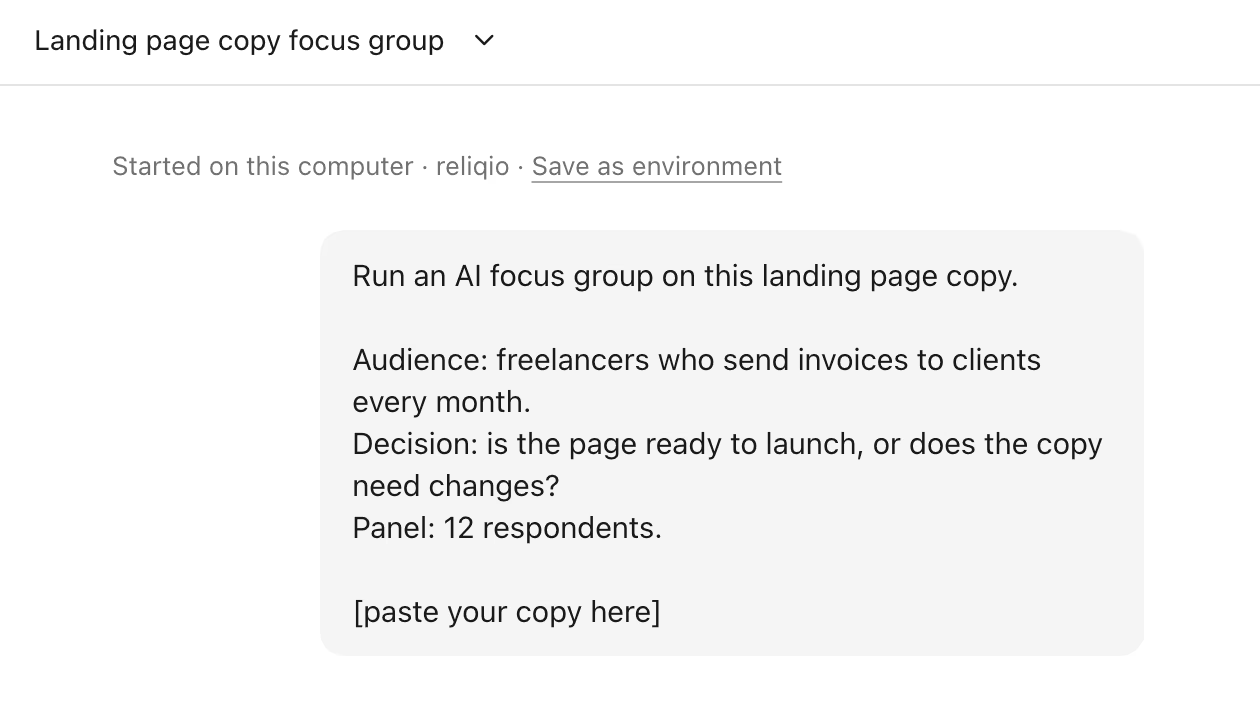
- Start a study. Send a request like this one, with your own audience, decision, and copy. Leave out the panel line to get 12 respondents.
Run an AI focus group on this landing page copy.

Audience: freelancers who send invoices to clients every month.
Decision: is the page ready to launch, or does the copy need changes?
Panel: 12 respondents.

[paste your copy here]
Describe the audience by role and situation: "office managers who order supplies for a small dental practice", not "buyers". Run one study per customer segment, and base each description on your own first-party research: interview notes, survey answers, CRM segments.
Questions? Answers.
Need help?
Vladimir’s ready when you are.
The basics
A study in which AI models play the respondents. Each one gets a fictional reader profile, answers interview questions on their own, and votes on statements drawn from the panel's answers.
AI respondents that stand in for the people you're writing for. You describe the audience, and the skill writes a synthetic persona for each candidate and seats a panel with a range of views.
The skill runs a study rather than giving one answer. It interviews a panel of AI personas separately, asks them to vote on statements drawn from their answers, and lets them debate the statements they split on. A second model checks the report's findings against the answers they cite.
Hosted AI user research tools are separate products, and at least one charges for access. This skill is free, runs on your computer with your own AI plan, and does one job: testing a piece of copy. You keep the interview answers, votes, and report as files.
Limits and reliability
No. Use the report to look for possible objections and places where your copy could be clearer. It can't tell you how many real people will buy.
No. We haven't run that comparison, so we don't know how closely the panel's answers match real readers'. Treat what the panel raises as questions to test with real users.
A second AI model checks every finding against the answers it cites. After the check, the skill removes unsupported claims from the report. Claims with partial support keep a note.
No. The panel reads text only. You can hand the chat a document or a web page and it pulls out the words, but the respondents never see the layout or the pictures.
Each study takes one version. Run a study for each version and compare the reports yourself.
Panel and models
Twelve by default. You can ask for any number from four to 24. The skill recruits twice as many candidates as seats and drops anyone who contradicts themselves in the recruiting questionnaire.
In Claude Code, Claude models play the respondents. To add OpenAI respondents to a Claude Code study, install Codex CLI, the separate program the skill uses to reach OpenAI models. Sign in with your ChatGPT account. In a Codex chat, OpenAI models play every respondent.
We've drafted connection instructions for Gemini CLI, Qwen Code, and Ollama, and all three are still untested. Ollama runs open models such as DeepSeek, Mistral, and Kimi. The skill recognizes Grok CLI by name and has no instructions for connecting to it.
No. The skill runs in Claude Code and in Codex, which can run programs on your computer. The regular chats can't. We haven't run it in Claude Code on the web.
Cost, time and privacy
The skill is free. A study uses your own AI plan: Claude requests count against your Claude plan, and OpenAI requests against your ChatGPT plan. The study we measured in Claude Code used 136 requests and about 661,500 tokens, the unit AI providers use to count text. The skill has no separate spending cap. The chat tells you how many requests it plans to send and waits for your approval before recruiting. It may send a few small setup requests first.
One Claude-only study took about seven minutes of running time, plus the time for the brief and the approvals. The skill estimates 20 to 30 minutes for a Claude Code study with OpenAI models on the panel.
To the AI providers you use. Claude sends it to Anthropic, and Codex sends it to OpenAI. The brief, the answers, and the report are saved on your computer. Nothing is sent to Reliqio.
Need help?
Vladimir’s ready when you are.
Opening the files…