
Abstract: We’ll explore how long tasks in JavaScript impact the rendering performance of our application, and more importantly, why real-time performance is pivotal for business success.
What exactly is rendering performance?
Rendering performance is essentially a measure of how swiftly your application — whether web or mobile — responds to changes and user interactions.
Picture this: when you click the sidenav toggle button, you want an immediate reaction and smooth animation, right? That’s rendering performance in action. It gauges how quickly an app responds to user actions and whether it causes any annoyance through stutters, delays, or other interruptions.
Why does this matter for your business?
Statistics show that poor performance can drastically reduce customer retention. Negative impressions from bad animations or slow responses tarnish the brand’s reputation. User engagement plummets.
A poorly optimized app suggests that the product might share the same quality issues.
In addition, the majority of users may have varying devices, imposing extra demands on your brand.
What affects performance, and how can we achieve optimal rendering?
To ensure your app performs optimally and smoothly, we need to render changes on the screen within each frame per second (FPS). For a screen running at 60 FPS, each frame has about 16.67 milliseconds to process.
Within this tight timeframe, the browser tackles several crucial phases:

Realistically, since the browser has its own internal tasks to manage, we need to complete our work under 10ms.Missing this window can halve the frame rate (from 60 FPS to 30 FPS), causing the content to stutter — a phenomenon known as jank, which significantly harms user experience.
For user interactions, the time threshold is at 50ms. Any task exceeding this duration negatively impacts user experience. When many long tasks occur, the interface feels sluggish and can appear broken if the main thread is blocked for too long.
Understanding JavaScript execution and tasks.
A task is any discrete JavaScript code that is scheduled to run through standard mechanisms, such as initiating a program, executing an event callback, or triggering a timeout or interval. These tasks are queued in the task queue.
Tasks are added to the task queue under the following conditions:
- A new JavaScript program or subprogram runs directly, like code executed in a console or within a
<script>element. - An event occurs, placing the event’s callback function in the task queue.
- A
setTimeout(),setInterval(),requestAnimationFrame()reaches its specified time, adding its callback to the task queue.
The event loop manages the execution of these tasks sequentially, according to their order in the queue. During each iteration of the event loop, the oldest task in the task queue is executed first.
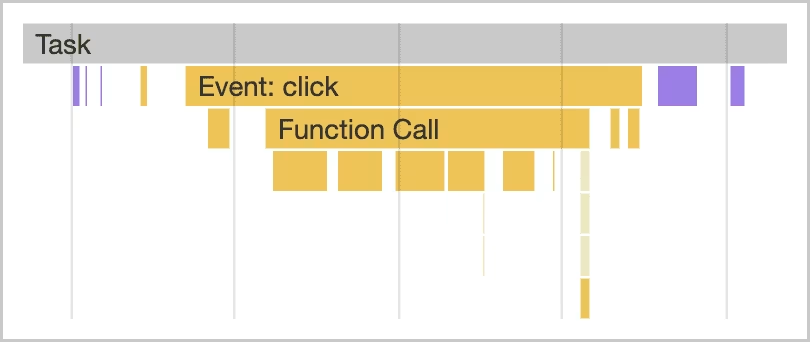
Tasks impact performance in two main ways:
- When the browser downloads a JavaScript file at startup, it queues tasks to parse and compile that JavaScript for later execution.
- During the page life, tasks queue up when JavaScript drives interactions through event handlers, animations, and background activities like analytics.
Explaining long tasks.
Let’s execute the following code:
function longTask() {
for (let i = 0; i < 30_000; i++) {
// Emulate CPU load, as using console.log
// with open devtools is a very CPU-intensive operation.
console.log(index);
}
}
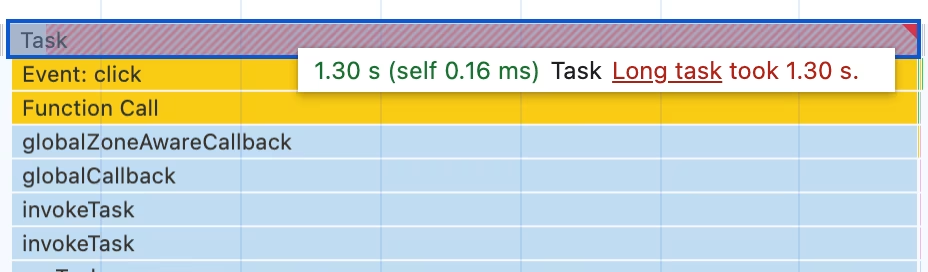
Any task exceeding 50ms is classified as a long task. The portion exceeding 50ms is termed the task’s blocking period. Remember, the browser blocks interactions from occurring while a task of any length is running.
In our case, it took us the whole 1.3s. How do we fit in 10ms limit?
First, we can break a long task into smaller subtasks wherever possible. In theory, this approach would allow the browser to respond to higher-priority work much sooner. In our case, it’s a click event handler task.
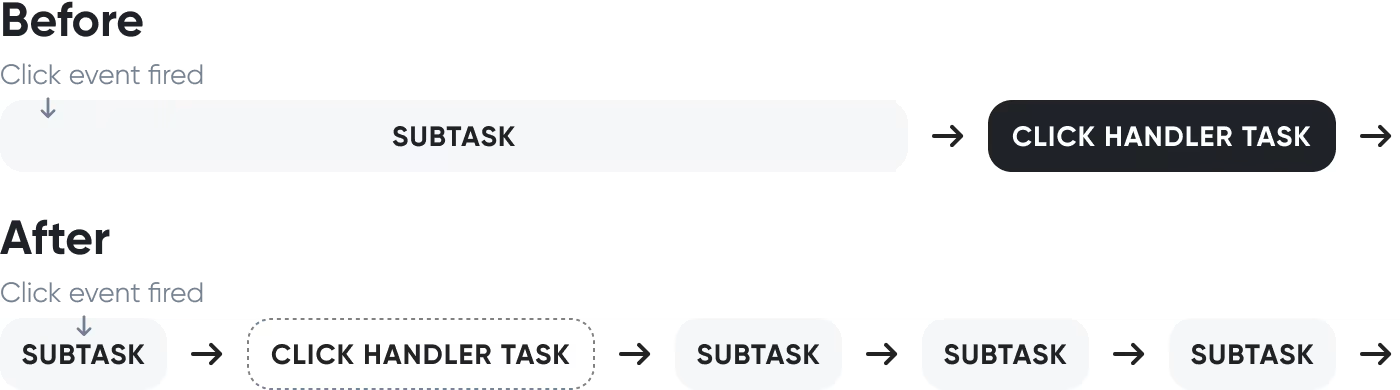
Let’s break down a long task and see what happens:
function task(name, num = 5_000) {
console.log(`Starting task: ${name}`);
for (let i = 0; i < num; i++) {
console.log(index);
}
}
function longTask() {
task('1');
task('2');
task('3');
task('4');
task('5');
task('6');
}
No impact, right?
For the browser, this still remains a long task running in the stack. JavaScript does not separate these functions into individual tasks because they are executed within the longTask function.
This is because JavaScript uses a run-to-completion task execution model, i.e. each task will run until it finishes, regardless of how long it blocks the main thread.
To make it work and avoid the event handler waiting for a long task to complete, we need to defer subsequent tasks to a later point in time in the task queue. To create a new task we can wrap our code with setTimeout or requestAnimationFrame.
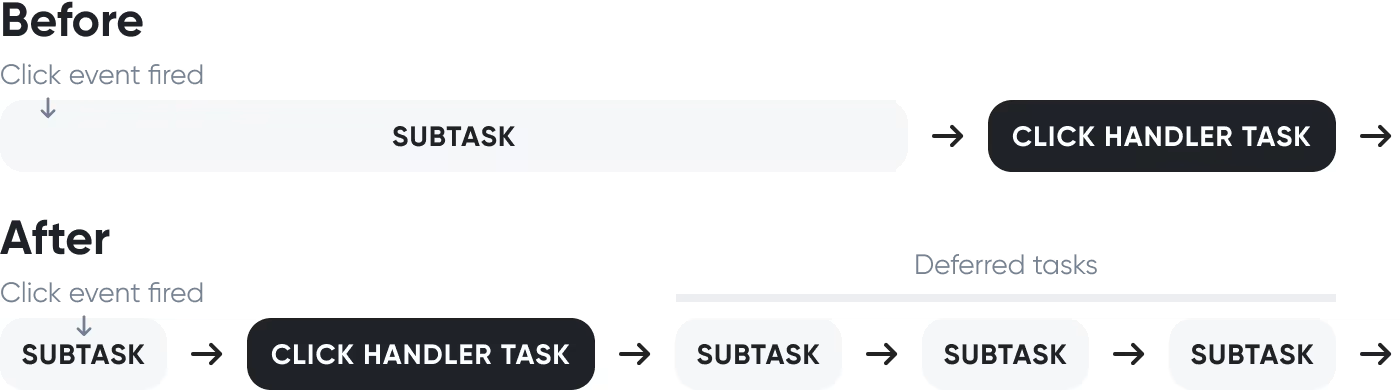
Here’s an improved version of the longTask function using setTimeout to defer some tasks:
function longTask() {
// Critical tasks.
task('1');
task('3');
// Deferring set of tasks.
setTimeout(() => {
task('2');
task('4');
task('5');
task('6');
});
}
The output:
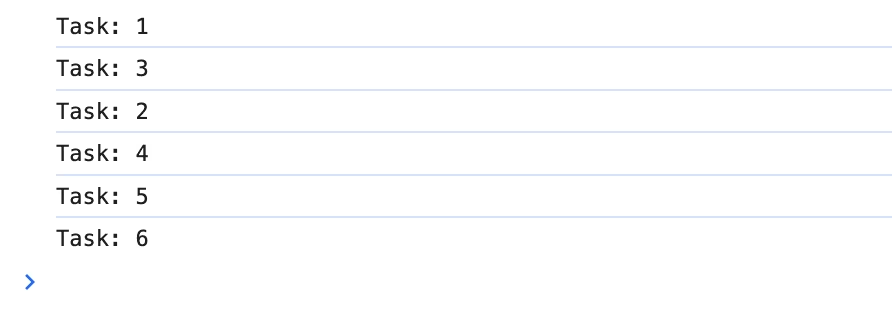
This technique, known as yielding, works best for sequential function execution.
Note: Yielding allows us to handle more critical tasks sooner, especially user-facing work like updating the user interface.
Yield with async/await.
To ensure that high-priority user-facing tasks are executed before those of lower priority, you can briefly interrupt the task queue to allow the browser to address more crucial tasks.
As mentioned previously, utilizing setTimeout can enable yielding to the main thread. For improved readability and convenience for sequential execution, you can incorporate setTimeout within a Promise.
function yieldToMain() {
return new Promise(resolve => {
setTimeout(resolve);
// requestAnimationFrame(resolve);
});
}
You can await yieldToMain() in any async function. Building off the previous example, you could create an array of functions to run, and yield to the main thread after each one runs:
async function longTask() {
const tasks = [
taskFn.bind(null, '1'),
taskFn.bind(null, '2'),
taskFn.bind(null, '3'),
taskFn.bind(null, '4'),
taskFn.bind(null, '5'),
taskFn.bind(null, '6'),
];
for (let i = 0; i < tasks.length; i++) {
tasks[i]();
await yieldToMain();
}
}
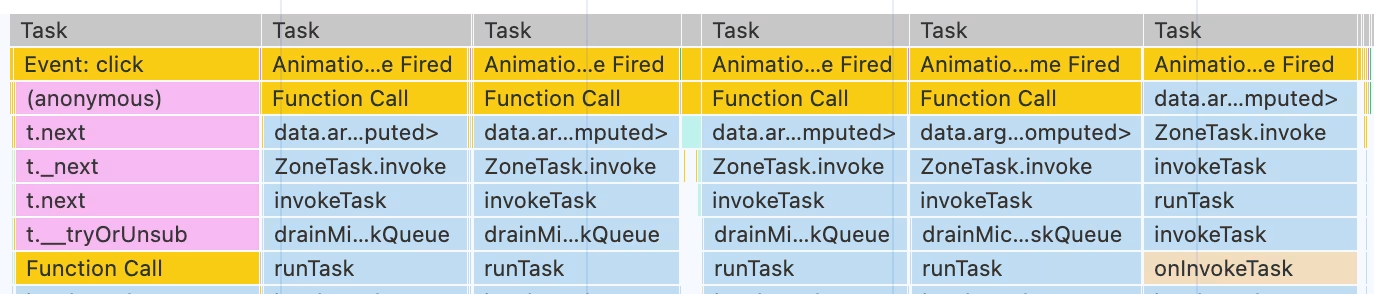
A real-world example.
We all know Redux or NgRx (Redux’s variant in Angular), either from firsthand experience or hearing from someone. The concept is straightforward: an action is dispatched upon a certain event, which is then caught by a reducer. This reducer might dispatch another action, and the cycle continues.
We were developing a Fintech/IoT app aimed at creating a mobile-friendly, embedded, high-performance floorplan editing tool for managing IoT assets, floors, rooms, zones, and labels within their facilities. This software solution connects to the device control framework, allowing corporate customers to visualize and manage their building equipment seamlessly.
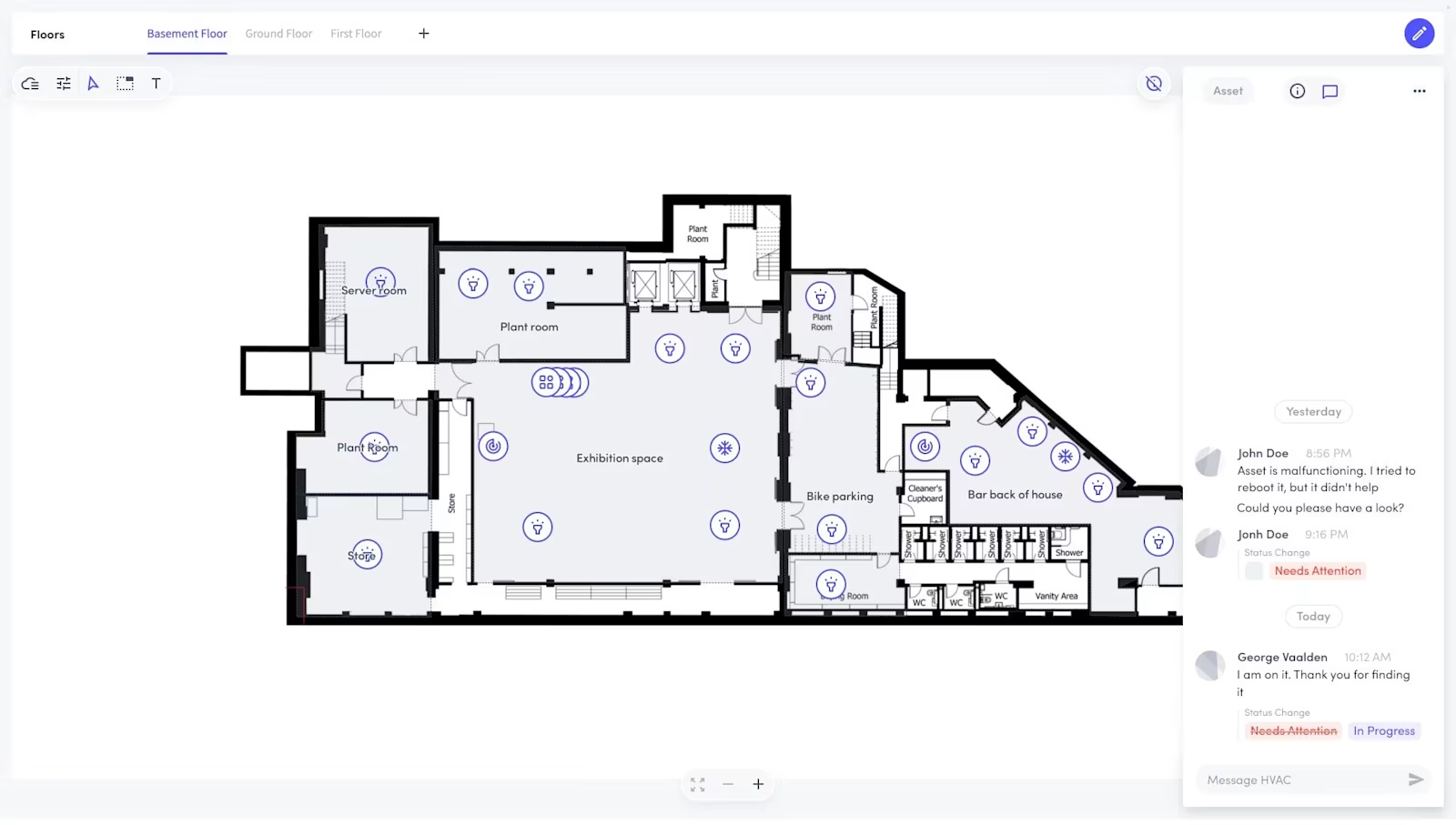
Architecturally, we used NgRx. Given the project’s complexity and its real-time requirements, we had an “endless” number of reducers and actions. There were instances where a functionality interacting with a device would invoke 6–7 other actions, like in the example described above.
As the project grew, we began to notice significant impacts on performance, animation smoothness, and user interaction delays.
We decided to apply the yielding approach and break up long tasks. This immediately reduced the load, and we quickly saw performance improvements and positive feedback from clients.
In the end, we achieved the desired 60 FPS without affecting the business logic.
Conclusion.
Managing tasks is challenging but crucial for ensuring swift user interaction responses. There’s no single strategy; rather, a myriad of techniques for managing and prioritizing tasks.
To summarize:
- Yield to the main thread for critical user-facing tasks.
- Minimize work per function to meet the
10msthreshold.
Using these tools, you can structure your app to prioritize user needs while ensuring less critical work also gets done, leading to a responsive, enjoyable user experience.